
The COM Express architecture, explained
The PICMG Computer-on-Module standard: CPU, RAM and chipset on a standard module, I/O on the carrier board you design. Here you find the pinout types, the four sizes and where the catalog starts.
What a Computer-on-Module is: computing becomes a component
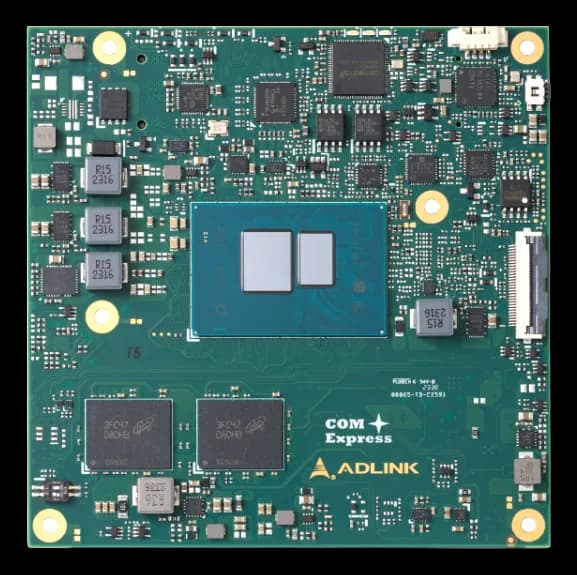
A Computer-on-Module is a module with everything a bootable computer needs — CPU, RAM, chipset — packaged as a super-component: I/O and power require a carrier board.
Modules mount on carrier boards designed around the application, with the useful connectors, I/O slots and any additional controllers. Like integrated circuits, COMs give OEMs full freedom on form-fit-function requirements, with reduced development time and cost: the computing core is standard, scalable and multivendor, and upgrades without redesigning the system.
COM Express is the open Computer-on-Module standard released by PICMG in 2005, designed to bridge the transition from parallel interfaces (PCI, parallel ATA) to serial ones (PCI Express, Serial ATA). It defines "Types" — pinout configurations on one or two 220-pin connectors — and four module sizes, compatible within each Type.
The service: COM-based SWaP systems How the engineering team works
What the specification says
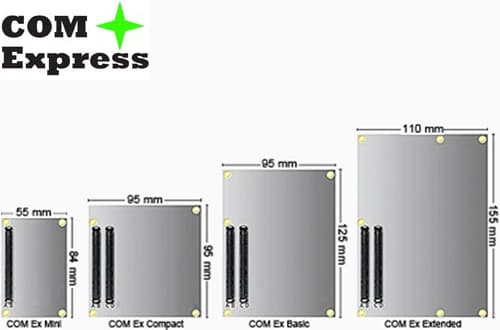
The four sizes, item by item
Same logic, different footprints: the Type stays compatible, the available area changes.4 entries
Mini
55 × 84 mm
The most compact of the family, typically with a Type 10 pinout on a single connector: for portable, low-power systems.
Compact
95 × 95 mm
The square that balances footprint and interfaces: it covers most mid-range embedded applications.
Basic
95 × 125 mm
The reference size for Type 6 and Type 7: more powerful processors, more memory, the bulk of the catalog.
Extended
110 × 155 mm
The specification's maximum area, for server-class configurations that precede the move to COM-HPC.
Types and families, in tables
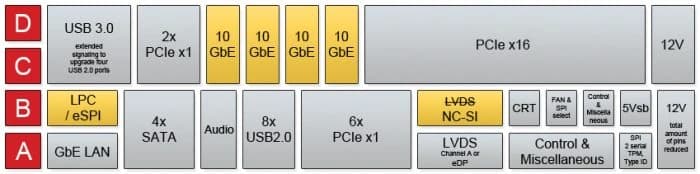
The Type says which interfaces come out of the connectors; the right COM family depends on the power and I/O required.2 tables
The most used pinout types
From the specification table: maximum interfaces per Type.
| Type | Connectors | PCI Express | LAN | Display | Notes |
|---|---|---|---|---|---|
| Type 2 | A-B C-D | up to 22 | 1 | VGA · LVDS · PEG/SDVO | 32-bit PCI and IDE: the parallel legacy |
| Type 6 | A-B C-D | up to 24 | 1 | LVDS/eDP · PEG · 3× DDI | the mainstream: USB 3.0, 2 COM, optional CAN |
| Type 7 | A-B C-D | up to 24 | 5 | server-oriented (headless) | the latest: edge servers, USB 3.0 |
| Type 10 | A-B | up to 4 | 1 | LVDS/eDP · 1× DDI | the Mini: 2 COM, USB 3.0, optional CAN |
COM families compared
SMARC, Qseven and COM Express split the field by power and I/O.
| SMARC | Qseven | COM Express | |
|---|---|---|---|
| Architecture | ARM & SoC | x86 | x86 |
| Typical TDP | 2 W | 12 W | 50 W |
| Connector | 314-pin edge (MXM3) | 230-pin edge (MXM2) | 1–2 × 220 pins |
| Power input | 1,5–5 V | 5 V | 4–18 V |
| Sizes | 82×50 · 82×80 mm | 70×70 · 70×40 mm | from 84×55 to 155×110 mm |

The COM Express catalog starts here
Computer-on-Module (COM)
Where COM Express works
Where the system is custom but computing must stay standard and upgradable.


Nearby architectures
The other Computer-on-Module paths, from low power to server class.

Let's talk about your project
Phone and email go straight to our technical sales team in Turin: the first answer is already a technical one.